Dashboard
Get a workspace-level overview of your API testing activity — collections, test suites, request chains, schedules, API coverage, test results, and recent executions — all in a single view.
The Dashboard provides a workspace-level overview of your API testing activities, coverage, and execution results. It gives teams a quick view of how many APIs are covered by test suites, how many test cases have been executed, the overall pass/fail status, and recent test executions. The dashboard helps you understand the current testing status of a workspace without having to navigate through individual test suites or executions.
Key capabilities
- View the total number of collections in the workspace.
- View the total number of test suites.
- View the total number of request chains.
- View the total number of scheduled executions.
- Track API coverage across the workspace.
- Track test case execution results.
- View passed and failed test cases.
- View recent test suite and request chain executions.
- Quickly navigate to commonly used API testing features.
- Monitor the overall testing activity of the workspace.
Workspace-level overview
The Dashboard is scoped to the current workspace. All metrics displayed on the dashboard represent the API testing activity and resources available within that workspace. This provides teams with a centralized view of their testing progress and execution status.
Workspace metrics
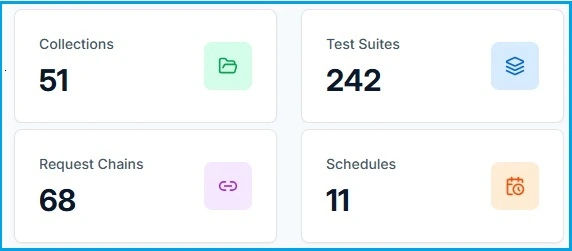
The dashboard provides an overview of the primary testing resources available in the workspace.
Collections
Displays the total number of API collections available in the workspace. Collections help organize API requests and provide a reusable source for building API workflows and tests.
Test Suites
Displays the total number of test suites created within the workspace. Test Suites group API test cases together for functional and other supported validations.
Request Chains
Displays the total number of request chains available in the workspace. Request Chains allow users to build dependent API workflows by connecting multiple requests and passing data between them.
Schedules
Displays the total number of scheduled API testing executions configured for the workspace. Schedules allow test automation to run according to configured schedules without requiring manual execution.
API Coverage
API Coverage shows how many APIs in the workspace are currently covered by Test Suites. The coverage is calculated based on the number of APIs that have been included and tested through Test Suites compared with the total number of APIs available in the workspace.
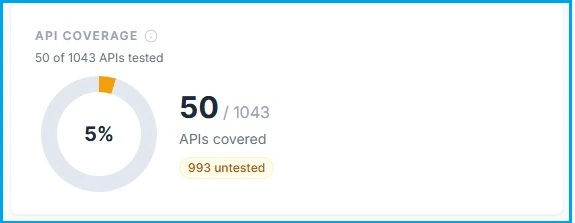
For example, if a workspace contains 1,043 total APIs and 50 APIs have been tested through Test Suites, the dashboard displays:
The dashboard also shows the number of APIs that have not yet been covered by a Test Suite.
Why API Coverage matters
API Coverage helps teams quickly understand:
- How many APIs are currently being tested.
- How many APIs remain untested.
- The overall API testing coverage of the workspace.
- Where additional test coverage may be required.
Test Results
Test Results shows the execution status of test cases executed as part of Test Suites within the workspace. The dashboard provides an overview of total test case executions, passed test cases, failed test cases, and the overall pass rate.
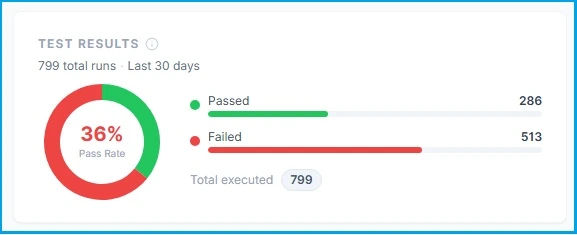
For example, if Test Suites have executed 799 test cases, with 286 passed and 513 failed, the dashboard displays 799 total runs and provides the corresponding pass/fail breakdown and pass rate.
What counts as a test result?
A test result represents the outcome of an individual test case execution within a Test Suite. For example:
Test Suite
    │
    ├── Test Case 1 → Passed
    ├── Test Case 2 → Failed
    ├── Test Case 3 → Passed
    └── Test Case 4 → Passed
In this example, the dashboard records 4 test case runs, rather than counting the entire suite as one result. This provides a more accurate view of actual test execution activity.
Recent Executions
The Recent Executions section provides a quick view of the latest test automation activity in the workspace. Users can see recently executed:
- Test Suites
- Request Chains
- Other supported automated workflows
Each execution provides a quick indication of its current or final status, such as Passed, Failed, or Running. Users can select an execution to view more detailed execution information and investigate failures.
Quick Links
The Dashboard provides quick access to commonly used API testing capabilities. For example:
Request Builder
Quickly create and execute an API request, configure variables, add assertions, and validate the response.
Create Test Suite
Create a Test Suite to generate, organize, and execute API test cases.
Additional quick links can be provided for frequently used workspace features based on the available functionality.
Understanding the Dashboard
The dashboard brings the key workspace metrics together in a single view:
Workspace
   │
   ├── Collections
   │
   ├── Test Suites
   │      │
   │      └── Test Cases
   │             │
   │             └── Test Results
   │
   ├── Request Chains
   │
   ├── Schedules
   │
   └── API Coverage
          │
          ├── Tested APIs
          └── Untested APIs
This gives teams a quick understanding of both testing coverage and testing execution health.
Dashboard at a glance
The dashboard answers key questions about the workspace:
| Metric | What it tells you |
|---|---|
| Collections | How many API collections are available in the workspace? |
| Test Suites | How many Test Suites have been created? |
| Request Chains | How many API workflows have been configured? |
| Schedules | How many automated schedules are configured? |
| API Coverage | How many workspace APIs are covered by Test Suites? |
| Test Results | How many Test Cases have been executed and how many passed or failed? |
| Recent Executions | What API testing activity has happened recently? |
API Coverage vs. Test Results
These two metrics are related but distinct, and are kept explicit to avoid confusing API coverage with test-case execution coverage:
| Metric | Definition |
|---|---|
| API Coverage | Number of APIs covered by Test Suites / Total APIs in the workspace. |
| Test Results | Number of Test Case executions performed through Test Suites, including their pass/fail results. |